Build A Coding Agent With Gpt 5.1
Source
- Canonical Cookbook page: https://developers.openai.com/cookbook/examples/build_a_coding_agent_with_gpt-5.1
- OpenAI Cookbook source: https://github.com/openai/openai-cookbook/blob/main/examples/Build_a_coding_agent_with_GPT-5.1.ipynb
- Raw source: https://raw.githubusercontent.com/openai/openai-cookbook/main/examples/Build_a_coding_agent_with_GPT-5.1.ipynb
- Source path:
examples/Build_a_coding_agent_with_GPT-5.1.ipynb - Source kind:
examples - Source format:
.ipynb - License basis: OpenAI Cookbook repository MIT license.
- Content hash:
6b6512f4fa0f6130da7c7f704639066d23d9c5d0c6adbe2d7ef57b979dc98f9c
Classification
- Primary category: GPT-5 / reasoning / prompting
- Wiki collection: 2026-05-15-openai-cookbook
- Taxonomy page: openai-cookbook-taxonomy
- Topic hub: openai-cookbook
Summary
Building a Coding Agent with GPT-5.1 and the OpenAI Agents SDK GPT-5.1 is exceptionally strong at coding, and with the new code-editing and command-execution tools available in the Responses API, it’s now easier than ever to build coding agents that can work across full codebases and iterate quickly. In this guide, we’ll use the Agents SDK to build a coding…
What This Teaches
- How to structure agent workflows, tool use, memory, evaluation, or multi-agent coordination.
Implementation Use Cases
- Use as a concrete implementation reference when building OpenAI API systems in this category.
- Compare against current official API docs before copying model names, SDK calls, or parameters into production code.
- Preserve this page as a mirrored source; prefer synthesis pages for personal recommendations or project-specific decisions.
Mirrored Content
Building a Coding Agent with GPT-5.1 and the OpenAI Agents SDK
GPT-5.1 is exceptionally strong at coding, and with the new code-editing and command-execution tools available in the Responses API, it’s now easier than ever to build coding agents that can work across full codebases and iterate quickly.
In this guide, we’ll use the Agents SDK to build a coding agent that can scaffold a brand-new app from a prompt and refine it through user feedback. Our agent will be equipped with the following tools:
- apply_patch — to edit files
- shell — to run shell commands
- web_search — to pull fresh information from the web
- Context7 MCP — to access up-to-date documentation
We’ll begin by focusing on the shell and web_search tools to generate a new project with web-sourced context. Then we’ll add apply_patch so the agent can iterate on the codebase, and we’ll connect it to the Context7 MCP server so it can write code informed by the most recent docs.
Set up the agent
With the Agents SDK, defining an agent is as simple as providing instructions and a list of tools. In this example, we want to use the newest gpt-5.1 model for its state-of-the-art coding abilities.
We’ll start by enabling web_search, which gives the agent the ability to look up up-to-date information online, and shell, which lets the agent propose shell commands for tasks like scaffolding, installing dependencies, and running build steps.
The shell tool works by letting the model propose commands it believes should be executed. Your environment is responsible for actually running those commands and returning the output.
The Agents SDK automates most of this command-execution handshake for you—you only need to implement the shell executor, the environment in which those commands will run.
%pip install openai-agents openai asyncioimport os
# Make sure your OpenAI API key is defined (you can set it on your global environment, or export it manually)
# export OPENAI_API_KEY="sk-..."
assert "OPENAI_API_KEY" in os.environ, "Please set OPENAI_API_KEY first."Define a working environment and shell executor
For simplicity, we’ll run shell commands locally and isolate them in a dedicated workspace directory. This ensures the agent only interacts with files inside that folder.
Note: In production, always execute shell commands in a sandboxed environment. Arbitrary command execution is inherently risky and must be tightly controlled.
# Create an isolated workspace for shell commands
from pathlib import Path

workspace_dir = Path("coding-agent-workspace").resolve()
workspace_dir.mkdir(exist_ok=True)

print(f"Workspace directory: {workspace_dir}")
We’ll now define a small ShellExecutor class that:
- Receives a
ShellCommandRequestfrom the agent - Optionally asks for approval before running commands
- Runs them using
asyncio.create_subprocess_shell - Returns a
ShellResultwith the outputs
All commands will run with cwd=workspace_dir, so they only affect files in that subfolder.
import asyncio
import os
from collections.abc import Sequence
from pathlib import Path
from typing import Literal

from agents import (
    ShellTool,
    ShellCommandRequest,
    ShellCommandOutput,
    ShellCallOutcome,
    ShellResult,
)


async def require_approval(commands: Sequence[str]) -> None:
    """
    Ask for confirmation before running shell commands.

    Set SHELL_AUTO_APPROVE=1 in your environment to skip this prompt
    (useful when you're iterating a lot or running in CI).
    """
    if os.environ.get("SHELL_AUTO_APPROVE") == "1":
        return

    print("Shell command approval required:")
    for entry in commands:
        print(" ", entry)
    response = input("Proceed? [y/N] ").strip().lower()
    if response not in {"y", "yes"}:
        raise RuntimeError("Shell command execution rejected by user.")


class ShellExecutor:
    """
    Shell executor for the notebook cookbook.

    - Runs all commands inside `workspace_dir`
    - Captures stdout/stderr
    - Enforces an optional timeout from `action.timeout_ms`
    - Returns a ShellResult with ShellCommandOutput entries using ShellCallOutcome
    """

    def __init__(self, cwd: Path):
        self.cwd = cwd

    async def __call__(self, request: ShellCommandRequest) -> ShellResult:
        action = request.data.action
        await require_approval(action.commands)

        outputs: list[ShellCommandOutput] = []

        for command in action.commands:
            proc = await asyncio.create_subprocess_shell(
                command,
                cwd=self.cwd,
                env=os.environ.copy(),
                stdout=asyncio.subprocess.PIPE,
                stderr=asyncio.subprocess.PIPE,
            )

            timed_out = False
            try:
                timeout = (action.timeout_ms or 0) / 1000 or None
                stdout_bytes, stderr_bytes = await asyncio.wait_for(
                    proc.communicate(),
                    timeout=timeout,
                )
            except asyncio.TimeoutError:
                proc.kill()
                stdout_bytes, stderr_bytes = await proc.communicate()
                timed_out = True

            stdout = stdout_bytes.decode("utf-8", errors="ignore")
            stderr = stderr_bytes.decode("utf-8", errors="ignore")

            # Use ShellCallOutcome instead of exit_code/status fields directly
            outcome = ShellCallOutcome(
                type="timeout" if timed_out else "exit",
                exit_code=getattr(proc, "returncode", None),
            )

            outputs.append(
                ShellCommandOutput(
                    command=command,
                    stdout=stdout,
                    stderr=stderr,
                    outcome=outcome,
                )
            )

            if timed_out:
                # Stop running further commands if this one timed out
                break

        return ShellResult(
            output=outputs,
            provider_data={"working_directory": str(self.cwd)},
        )


shell_tool = ShellTool(executor=ShellExecutor(cwd=workspace_dir))
Define the agent
# Define the agent's instructions
INSTRUCTIONS = '''
You are a coding assistant. The user will explain what they want to build, and your goal is to run commands to generate a new app.
You can search the web to find which command you should use based on the technical stack, and use commands to create code files.
You should also install necessary dependencies for the project to work.
'''
from agents import Agent, Runner, ShellTool, WebSearchTool
coding_agent = Agent(
name="Coding Agent",
model="gpt-5.1",
instructions=INSTRUCTIONS,
tools=[
WebSearchTool(),
shell_tool
]
)Start a new project
Let’s send a prompt to our coding agent and then inspect the files it created in the workspace_dir.
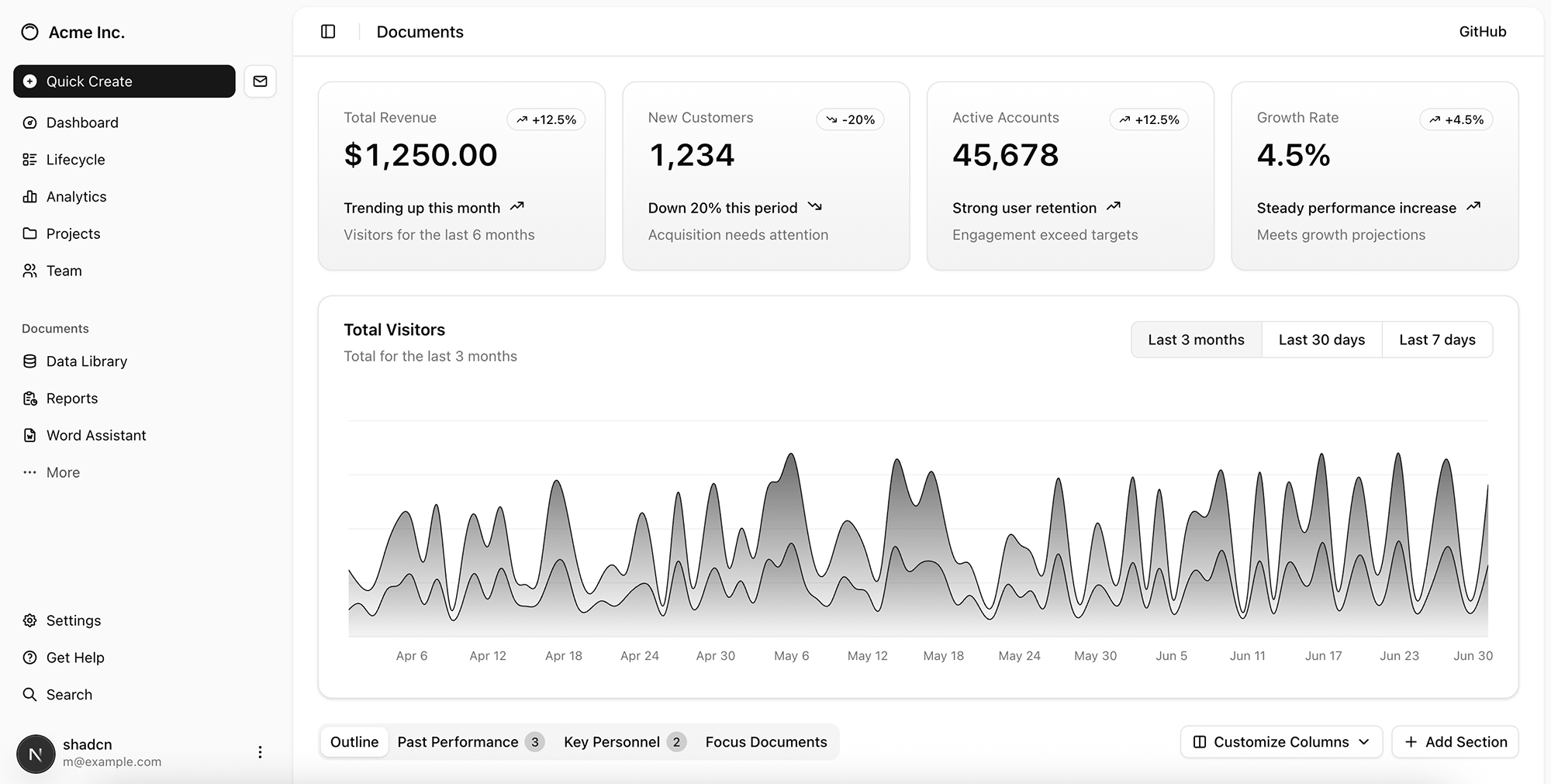
In this example, we’ll create a NextJS dashboard using the shadcn library.
Note: sometimes you might run into an MaxTurnsExceeded error, or the project might have a dependency error. Simply run the agent loop again. In a production environment, you would implement an external loop or user input handling to iterate if the project creation fails.
prompt = "Create a new NextJS app that shows dashboard-01 from https://ui.shadcn.com/blocks on the home page"import asyncio
from agents import ItemHelpers, RunConfig
async def run_coding_agent_with_logs(prompt: str):
"""
Run the coding agent and stream logs about what's happening
"""
print("=== Run starting ===")
print(f"[user] {prompt}\n")
result = Runner.run_streamed(
coding_agent,
input=prompt
)
async for event in result.stream_events():
# High-level items: messages, tool calls, tool outputs, MCP, etc.
if event.type == "run_item_stream_event":
item = event.item
# 1) Tool calls (function tools, web_search, shell, MCP, etc.)
if item.type == "tool_call_item":
raw = item.raw_item
raw_type_name = type(raw).__name__
# Special-case the ones we care most about in this cookbook
if raw_type_name == "ResponseFunctionWebSearch":
print("[tool] web_search_call – agent is calling web search")
elif raw_type_name == "LocalShellCall":
# LocalShellCall.action.commands is where the commands live
commands = getattr(getattr(raw, "action", None), "commands", None)
if commands:
print(f"[tool] shell – running commands: {commands}")
else:
print("[tool] shell – running command")
else:
# Generic fallback for other tools (MCP, function tools, etc.)
print(f"[tool] {raw_type_name} called")
# 2) Tool call outputs
elif item.type == "tool_call_output_item":
# item.output is whatever your tool returned (could be structured)
output_preview = str(item.output)
if len(output_preview) > 400:
output_preview = output_preview[:400] + "…"
print(f"[tool output] {output_preview}")
# 3) Normal assistant messages
elif item.type == "message_output_item":
text = ItemHelpers.text_message_output(item)
print(f"[assistant]\n{text}\n")
# 4) Other event types (reasoning, MCP list tools, etc.) – ignore
else:
pass
print("=== Run complete ===\n")
# Once streaming is done, result.final_output contains the final answer
print("Final answer:\n")
print(result.final_output)await run_coding_agent_with_logs(prompt)Once the agent is done creating the initial project (you should see a ”= Run complete =” log followed by the final answer), you can check the output with the following commands:
cd coding-agent-workspace/<name_of_the_project>
npm run dev
You should see something like this:
Iterate on the project
Now that we have an initial version of the app, we can start iterating using the apply_patch tool. We also want to include calls to the OpenAI Responses API, and for that, the model should have access to the most up-to-date documentation. To make this possible, we’ll connect the agent to the Context7 MCP server, which provides up-to-date docs.
Set up the apply_patch tool for in-place edits
Note: in production you’ll typically want to run these edits in a sandboxed project workspace (e.g. ephemeral containers), and work with IDEs.
import hashlib
import os
from pathlib import Path

from agents import ApplyPatchTool
from agents.editor import ApplyPatchOperation, ApplyPatchResult


class ApprovalTracker:
    """Tracks which apply_patch operations have already been approved."""

    def __init__(self) -> None:
        self._approved: set[str] = set()

    def fingerprint(self, operation: ApplyPatchOperation, relative_path: str) -> str:
        hasher = hashlib.sha256()
        hasher.update(operation.type.encode("utf-8"))
        hasher.update(b"\0")
        hasher.update(relative_path.encode("utf-8"))
        hasher.update(b"\0")
        hasher.update((operation.diff or "").encode("utf-8"))
        return hasher.hexdigest()

    def remember(self, fingerprint: str) -> None:
        self._approved.add(fingerprint)

    def is_approved(self, fingerprint: str) -> bool:
        return fingerprint in self._approved


class WorkspaceEditor:
    """
    Minimal editor for the apply_patch tool:
    - keeps all edits under `root`
    - optional manual approval (APPLY_PATCH_AUTO_APPROVE=1 to skip prompts)
    """

    def __init__(self, root: Path, approvals: ApprovalTracker, auto_approve: bool = False) -> None:
        self._root = root.resolve()
        self._approvals = approvals
        self._auto_approve = auto_approve or os.environ.get("APPLY_PATCH_AUTO_APPROVE") == "1"

    def create_file(self, operation: ApplyPatchOperation) -> ApplyPatchResult:
        relative = self._relative_path(operation.path)
        self._require_approval(operation, relative)
        target = self._resolve(operation.path, ensure_parent=True)
        diff = operation.diff or ""
        content = apply_unified_diff("", diff, create=True)
        target.write_text(content, encoding="utf-8")
        return ApplyPatchResult(output=f"Created {relative}")

    def update_file(self, operation: ApplyPatchOperation) -> ApplyPatchResult:
        relative = self._relative_path(operation.path)
        self._require_approval(operation, relative)
        target = self._resolve(operation.path)
        original = target.read_text(encoding="utf-8")
        diff = operation.diff or ""
        patched = apply_unified_diff(original, diff)
        target.write_text(patched, encoding="utf-8")
        return ApplyPatchResult(output=f"Updated {relative}")

    def delete_file(self, operation: ApplyPatchOperation) -> ApplyPatchResult:
        relative = self._relative_path(operation.path)
        self._require_approval(operation, relative)
        target = self._resolve(operation.path)
        target.unlink(missing_ok=True)
        return ApplyPatchResult(output=f"Deleted {relative}")

    def _relative_path(self, value: str) -> str:
        resolved = self._resolve(value)
        return resolved.relative_to(self._root).as_posix()

    def _resolve(self, relative: str, ensure_parent: bool = False) -> Path:
        candidate = Path(relative)
        target = candidate if candidate.is_absolute() else (self._root / candidate)
        target = target.resolve()
        try:
            target.relative_to(self._root)
        except ValueError:
            raise RuntimeError(f"Operation outside workspace: {relative}") from None
        if ensure_parent:
            target.parent.mkdir(parents=True, exist_ok=True)
        return target

    def _require_approval(self, operation: ApplyPatchOperation, display_path: str) -> None:
        fingerprint = self._approvals.fingerprint(operation, display_path)
        if self._auto_approve or self._approvals.is_approved(fingerprint):
            self._approvals.remember(fingerprint)
            return

        print("\n[apply_patch] approval required")
        print(f"- type: {operation.type}")
        print(f"- path: {display_path}")
        if operation.diff:
            preview = operation.diff if len(operation.diff) < 400 else f"{operation.diff[:400]}…"
            print("- diff preview:\n", preview)
        answer = input("Proceed? [y/N] ").strip().lower()
        if answer not in {"y", "yes"}:
            raise RuntimeError("Apply patch operation rejected by user.")
        self._approvals.remember(fingerprint)


def apply_unified_diff(original: str, diff: str, create: bool = False) -> str:
    """
    Simple "diff" applier (adapt this based on your environment)

    - For create_file, the diff can be the full desired file contents,
      optionally with leading '+' on each line.
    - For update_file, we treat the diff as the new file contents:
      keep lines starting with ' ' or '+', drop '-' lines and diff headers.

    This avoids context/delete mismatch errors while still letting the model
    send familiar diff-like patches.
    """
    if not diff:
        return original

    lines = diff.splitlines()
    body: list[str] = []

    for line in lines:
        if not line:
            body.append("")
            continue

        # Skip typical unified diff headers / metadata
        if line.startswith("@@") or line.startswith("---") or line.startswith("+++"):
            continue

        prefix = line[0]
        content = line[1:]

        if prefix in ("+", " "):
            body.append(content)
        elif prefix in ("-", "\\"):
            # skip deletions and "\ No newline at end of file"
            continue
        else:
            # If it doesn't look like diff syntax, keep the full line
            body.append(line)

    text = "\n".join(body)
    if diff.endswith("\n"):
        text += "\n"
    return text


approvals = ApprovalTracker()
editor = WorkspaceEditor(root=workspace_dir, approvals=approvals, auto_approve=True)
apply_patch_tool = ApplyPatchTool(editor=editor)
Connect to the the Context7 MCP server
# Optional: set CONTEXT7_API_KEY in your environment for higher rate limits
CONTEXT7_API_KEY = os.getenv("CONTEXT7_API_KEY")
from agents import HostedMCPTool
context7_tool = HostedMCPTool(
tool_config={
"type": "mcp",
"server_label": "context7",
"server_url": "https://mcp.context7.com/mcp",
# Basic usage works without auth; for higher rate limits, pass your key here.
**(
{"authorization": f"Bearer {CONTEXT7_API_KEY}"}
if CONTEXT7_API_KEY
else {}
),
"require_approval": "never",
},
)Update the agent
Let’s create a new agent that also uses these two additional tools, and update the instructions accordingly. To avoid a context mismatch when applying the diffs, for this agent we’ll specify not to edit files via a command.
UPDATED_INSTRUCTIONS = """
You are a coding assistant helping a user with an existing project.
Use the apply_patch tool to edit files based on their feedback.
When editing files:
- Never edit code via shell commands.
- Always read the file first using `cat` with the shell tool.
- Then generate a unified diff relative to EXACTLY that content.
- Use apply_patch only once per edit attempt.
- If apply_patch fails, stop and report the error; do NOT retry.
You can search the web to find which command you should use based on the technical stack, and use commands to install dependencies if needed.
When the user refers to an external API, use the Context7 MCP server to fetch docs for that API.
For example, if they want to use the OpenAI API, search docs for the openai-python or openai-node sdk depending on the project stack.
"""
updated_coding_agent = Agent(
name="Updated Coding Agent",
model="gpt-5.1",
instructions=UPDATED_INSTRUCTIONS,
tools=[
WebSearchTool(),
shell_tool,
apply_patch_tool,
context7_tool,
]
)Run the agent to edit the project
import asyncio
from agents import ItemHelpers, Runner


async def run_updated_coding_agent_with_logs(prompt: str):
    """
    Run the updated coding agent (shell + web + apply_patch + Context7 MCP)
    and stream logs about what's happening.

    - Logs web_search, shell, apply_patch, and MCP (Context7) calls.
    - For apply_patch, logs the outputs returned by the editor.
    - At the end, shows a single "Apply all changes?" prompt for the tutorial.
    """
    print("=== Run starting ===")
    print(f"[user] {prompt}\n")

    apply_patch_seen = False

    # Start streamed run
    result = Runner.run_streamed(
        updated_coding_agent,
        input=prompt,
    )

    async for event in result.stream_events():
        if event.type != "run_item_stream_event":
            continue

        item = event.item

        # 1) Tool calls (function tools, web_search, shell, MCP, etc.)
        if item.type == "tool_call_item":
            raw = item.raw_item
            raw_type_name = type(raw).__name__

            # web_search (hosted Responses tool)
            if raw_type_name == "ResponseFunctionWebSearch":
                print("[tool] web_search – agent is calling web search")

            # shell (new ShellTool executor)
            elif raw_type_name == "LocalShellCall":
                action = getattr(raw, "action", None)
                commands = getattr(action, "commands", None) if action else None
                if commands:
                    print(f"[tool] shell – running commands: {commands}")
                else:
                    print("[tool] shell – running command")

            # MCP (e.g. Context7)
            elif "MCP" in raw_type_name or "Mcp" in raw_type_name:
                tool_name = getattr(raw, "tool_name", None)
                if tool_name is None:
                    action = getattr(raw, "action", None)
                    tool_name = getattr(action, "tool", None) if action else None
                server_label = getattr(raw, "server_label", None)
                label_str = f" (server={server_label})" if server_label else ""
                if tool_name:
                    print(f"[tool] mcp{label_str} – calling tool {tool_name!r}")
                else:
                    print(f"[tool] mcp{label_str} – MCP tool call")

            # Generic fallback for other tools (including hosted ones)
            else:
                print(f"[tool] {raw_type_name} called")

        # 2) Tool call outputs (where apply_patch shows up)
        elif item.type == "tool_call_output_item":
            raw = item.raw_item
            output_preview = str(item.output)

            # Detect apply_patch via raw_item type or output format
            is_apply_patch = False
            if isinstance(raw, dict) and raw.get("type") == "apply_patch_call_output":
                is_apply_patch = True
            elif any(
                output_preview.startswith(prefix)
                for prefix in ("Created ", "Updated ", "Deleted ")
            ):
                is_apply_patch = True

            if is_apply_patch:
                apply_patch_seen = True
                if len(output_preview) > 400:
                    output_preview = output_preview[:400] + "…"
                print(f"[apply_patch] {output_preview}\n")
            else:
                if len(output_preview) > 400:
                    output_preview = output_preview[:400] + "…"
                print(f"[tool output]\n{output_preview}\n")

        # 3) Normal assistant messages
        elif item.type == "message_output_item":
            text = ItemHelpers.text_message_output(item)
            print(f"[assistant]\n{text}\n")

        # 4) Other event types – ignore for now
        else:
            pass

    print("=== Run complete ===\n")

    # Final answer
    print("Final answer:\n")
    print(result.final_output)

    # Single end-of-run confirmation about edits
    if apply_patch_seen:
        _ = print("\n[apply_patch] One or more apply_patch calls were executed.")
    else:
        print("\n[apply_patch] No apply_patch calls detected in this run.")
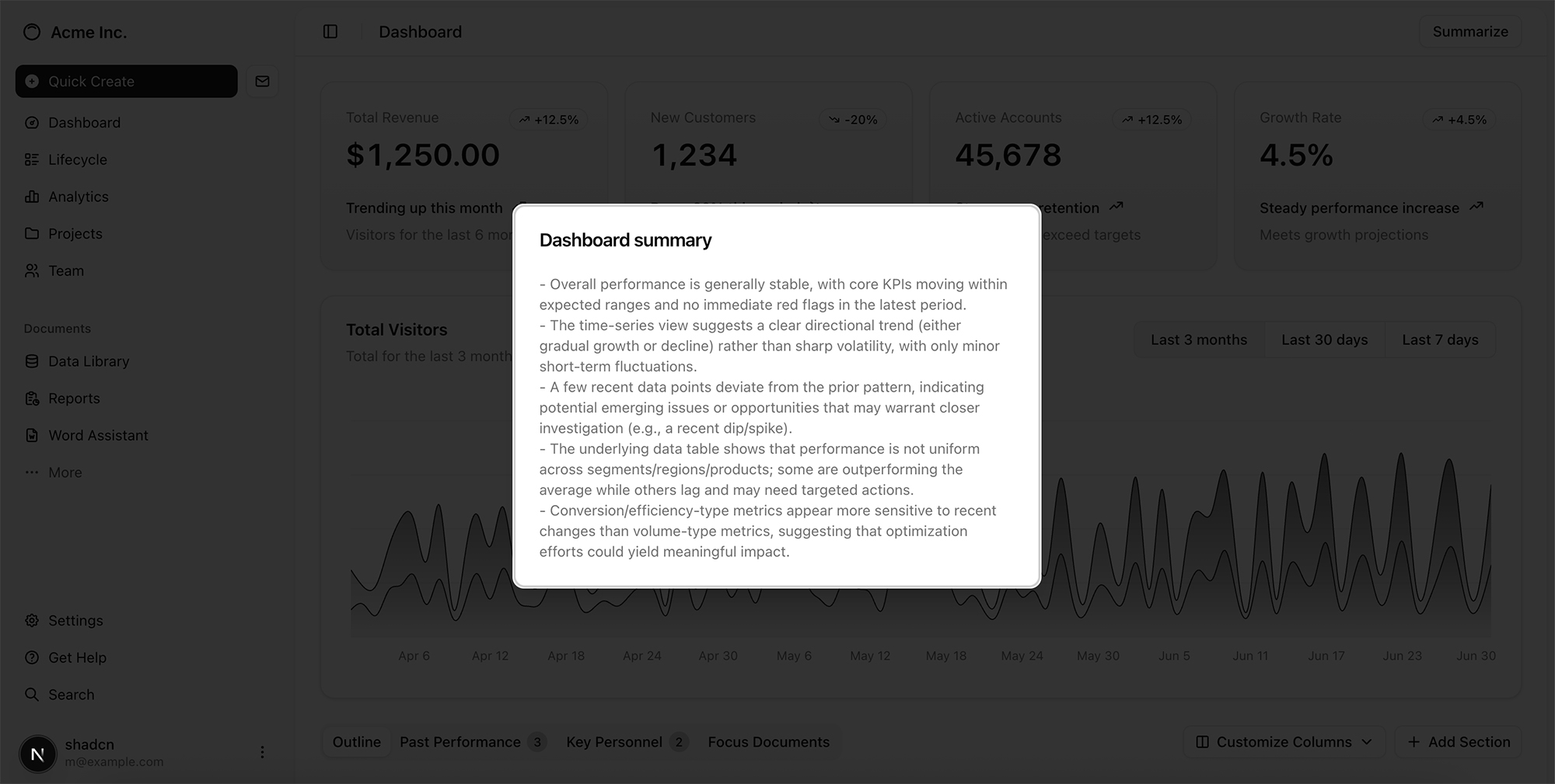
edit_prompt = '''Update the dashboard to add a 'summarize' button in the top right corner.
When clicked, use the OpenAI Responses API with the gpt-5.1 model to generate a summary of the metrics on the dashboard, and display it in a modal.'''await run_updated_coding_agent_with_logs(edit_prompt)Once the agent is done updating the project (you should see a ”= Run complete =” log followed by the final answer), you will see the updated UI, with the OpenAI Responses API call to summarize what’s on the dashboard.
Note: If this step fails, you can re-run the agent loop. In a production environment, you would implement an outer loop that handles errors or wait for user input and iterate.
Wrapping up
In this cookbook guide, we built a coding agent that can scaffold a project, refine it through patches, execute commands, and stay up to date with external documentation. By combining GPT 5.1 with the Agents SDK and tools like shell, apply_patch, web_search, and the Context7 MCP, you can create agents that don’t just generate code—they actively work with codebases: running commands, applying edits, pulling in fresh context, and evolving a project end-to-end.
This workflow is a powerful blueprint for building agents that feel less like tools and more like collaborators. You can extend this pattern to integrate agents into IDEs or code sandboxes, generate new apps from scratch, work across large codebases, or even collaborate with developers in real time.